Logmein ActiveX Registry

09 Dec 2008

I ran into a problem with LogMeIn where I couldn't access my remote/target computer through ActiveX connections - only through the Java connection. When I tried to connect through ActiveX I would get access to the desktop and then after a couple of mouse clicks LogMeIn would "freeze up". I couldn't click on the screen to open programs, close windows, etc.

From talking to LogMeIn support they said a possibility was that I was doubled NAT'ed and Java was better at negotiating those type of connections. I knew that wasn't the case because I only had 1 router in between the connection.

It turns out there is a registry key that can be edited so you longer experience LogMeIn freezing up when connecting through ActiveX. I really prefer the ActiveX connection because it gives you more options and seems to work a lot quicker (especially upon first connect).

So, if you are experiencing the same problem where ActiveX is not working, but Java is, try editing the following registry key:

HKEY_LOCAL_MACHINESOFTWARE\LogMeIn\V5\Net\NATUDP
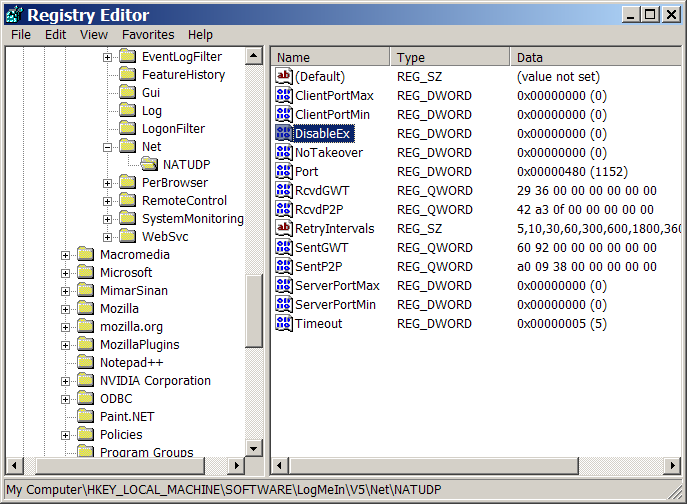
Double Click the DWORD Entry "DisableEx" and change the value from 0 to 1
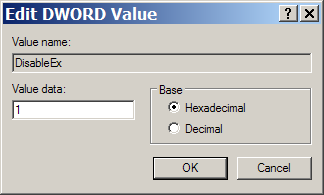
Note: I ran across one situation where my computer did not have the DisableEx key listed in the registry. If this happens just create a new DWORD value and name it DisableEx and give it a value of 1.

Tags:  | 

Comments

Thanks a lot for posting this

Thanks a lot for posting this fix, this problem was driving me nuts for several weeks now, one by one my computers became inaccessible with the new logmein updates; one thing is for sure, as long as they service consists of "download a zipped install package and install from there" where I even supplied them with all ogs and pointed out the stage where things go wrong, I'm not willing to pay for it, I think they are a bit victim of their own success ...
Ronny | Oct 21st, 2009 at 4:33 am

Glad to hear this helped fix

Glad to hear this helped fix your problem - thanks for letting me know ;)
sdykman | Oct 21st, 2009 at 12:17 pm

Changing the register from 0

Changing the register from 0 to 1 did not help me.

Logmein suggested I :

A. Once connected to the host computer, go to Preferences > General Settings. Uncheck the option Use Display Accelerator. Click OK at the bottom of the screen.

B. Please also try reinstalling the ActiveX/Firefox Remote Control plugin (linked below). (In the client computer.)

To remove the ActiveX control in Internet Explorer 6 of the client computer:

  1. Open Internet Explorer and go to Tools > Internet Options > Settings > View Objects.
  2. Locate the Performance Viewer ActiveX control.
  3. Right click and choose Remove.

I tried both of these things and neither worked.
Very frustrating.

Mike E.

Mike E. | May 23rd, 2010 at 12:54 am

Post new comment

The content of this field is kept private and will not be shown publicly.
  • Lines and paragraphs break automatically.
  • Web page addresses and e-mail addresses turn into links automatically.
  • Allowed HTML tags: <a> <em> <strong> <cite> <code> <ul> <ol> <li> <dl> <dt> <dd>

More information about formatting options